
 English
 Español
 Français
 Deutsch
 Polski
 Türkçe
 Русский
 简体中文
简体中文Aerospace & defense
Multi-face parts, thin-wall structures, hard alloys, and projects where repeatable datum control matters more than raw clamping force alone.
Start with the setup problem you need to solve, then compare the industries and fixture directions that usually fit best. This page is built for teams narrowing down datum logic, repeatability targets, changeover speed, and automation readiness.
Start with
part type + setup pain
Then match
datum logic + fixture family
Scale into
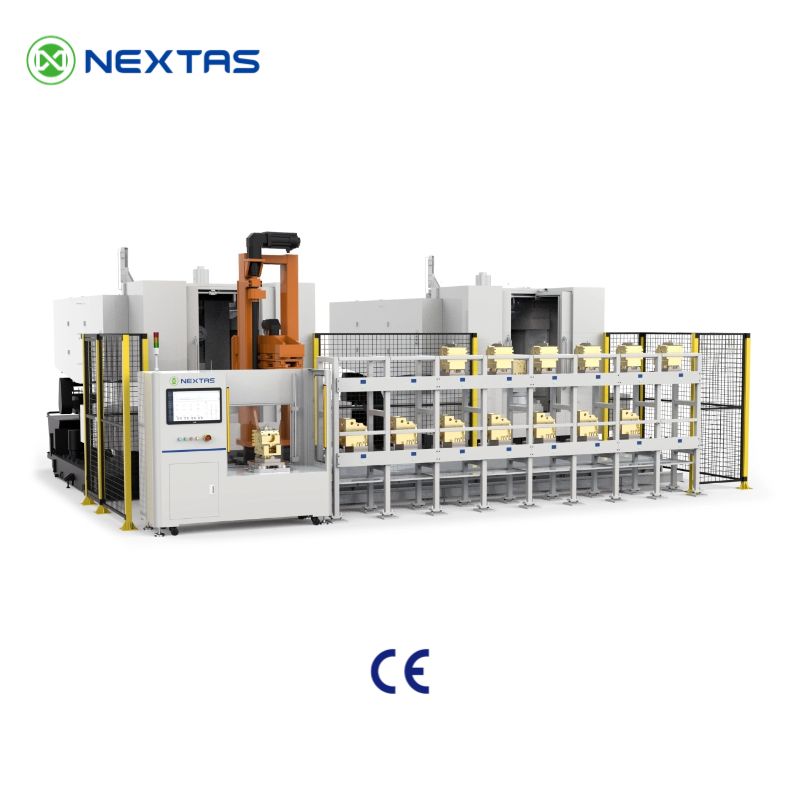
robotic or palletized production
Application routes
Start by the first decision
These shortcuts are for teams who already know the pain point and want to reach the most relevant application page faster.
01 · Thin-wall control
Best starting point for aerospace-style parts, open-access machining, and balanced support.
Open aerospace route →02 · Datum transfer
A strong match when re-indicating costs too much time across multi-step workflows.
Open mold & die route →03 · Faster changeovers
Useful when the main goal is shorter downtime, repeatability, and scalable station logic.
Open automotive route →04 · Automation readiness
Good for teams planning palletization, robotic loading, or lights-out expansion after validation.
Open new energy route →Our application coverage follows the core sectors highlighted across the Nextas catalog: aerospace, semiconductor, medical equipment, automotive and new energy, mold & die, defense and shipbuilding, laser and precision manufacturing, and automation-focused production lines.
Multi-face parts, thin-wall structures, hard alloys, and projects where repeatable datum control matters more than raw clamping force alone.
Tight tolerance parts, inspection transfer, stable fixturing logic, and cleaner datum handling across repeated process steps.
Smaller workpieces, delicate walls, machined surfaces that cannot be damaged, and the need to reduce part distortion during clamping.
Cycle consistency, palletized loading, scalable production cells, and fixture logic that can grow from one machine to multiple stations.
Repeatable transfer between milling, EDM, inspection, spotting, and repair workflows where re-indicating costs too much time.
Large or difficult parts that benefit from stronger datum protection, stable re-clamping, and easier fixture organization across teams.
Projects that need fast setup recovery, consistent loading, and interfaces that keep part-to-part variation under control.
Robot loading, pallet logic, multi-shift production, and fixture standards that make future automation expansion easier instead of harder.
This keeps the page useful for both engineers and sourcing teams. Choose the path that best matches your current production pressure.
Best for workshops where operator dependency, re-indicating, and fixture changeover are the biggest hidden cost.
Best for delicate parts, hard materials, or multi-op projects where re-clamp repeatability directly affects scrap and inspection results.
Best for teams planning robotic loading, pallet changers, or multi-shift output where fixture interfaces must stay consistent.
Use these pages when you already know the target industry and want a narrower view of risk factors, recommendations, and internal linking for search intent.
5-axis access, thin-wall rigidity, and repeatable datums for complex structural and high-value parts.
Repeatable loading, takt stability, palletized workflows, and scalable production for machining cells.
Precision transfer, cleaner datum handling, and stable fixture behavior across machining and inspection steps.
Low distortion clamping, small-part stability, and better surface protection for delicate components.
EDM, electrode, mold transfer, and maintenance workflows that need repeatability after every removal.
Fixture logic for EV, battery, inverter, and scalable production projects that may later automate.
This matrix is designed for fast internal review. It helps bridge quoting, process engineering, and supplier evaluation without forcing buyers to compare every product family from scratch.
| Application | Typical concern | Recommended starting point | Why it fits |
|---|---|---|---|
| 5-axis complex parts | Tool access, repeatable re-clamp, controlled stack-up | Zero-Point Systems + Dovetail Fixture | Low-profile interfaces help preserve datum logic while opening access for angled tools and multi-face cuts. |
| Thin-wall or delicate components | Distortion, chatter, surface damage | Self-Centering Vise or Dovetail Fixture | Balanced clamping and shorter force paths reduce movement and improve consistency on fragile geometries. |
| High-mix / low-volume machining | Setup time, operator variation, fixture sprawl | Zero-Point Clamping Plate or Pneumatic Zero-Point Plate | Standardized interfaces make it easier to preload fixtures offline and shorten non-cutting time. |
| EDM, electrode, and mold transfer | Repeatability after removal, transfer between operations | E-Series Chuck or R-Series Chuck | Datum chuck systems support repeated transfer between machining, EDM, and inspection without rebuilding the setup each time. |
| Palletized or robotic loading | Reliable locking, interface consistency, future scalability | BDS Positioning Datum + Automation Series | Repeatable machine-side datums and automation-ready logic help connect one machine today to a cell tomorrow. |
| Batch parts with takt pressure | Cycle consistency, clamp stability, faster load/unload | Pneumatic Vise or Customized Hydraulic Fixture | Pneumatic and hydraulic fixture concepts help stabilize loading steps and support more repeatable takt performance. |
This section gives buyers a cleaner hand-off from application research into actual product families without forcing a hard sell too early.
Good for standardized datum transfer, offline fixture preparation, and repeatable re-clamping across machines.
View solution →Ideal for 5-axis access, balanced clamping, and repeatable loading on parts that need more direct grip logic.
View solution →Used when EDM, electrodes, mold maintenance, and precision transfer workflows depend on a consistent reference interface.
View solution →Designed for stable positioning logic that can connect manual loading today with pallet, robot, or cell automation later.
View solution →The applications page should help qualify a project, not just attract traffic. These are the points that typically separate a good concept from a production-ready one.
Material, wall thickness, locating surfaces, forbidden clamp surfaces, and whether the part needs 3-axis, 4-axis, or 5-axis access.
Functional datums, re-clamp logic, stack-up height, and whether the process needs transfer between machining, inspection, and EDM.
Table size, axis travel, rotary access, spindle reach, coolant behavior, and robot or pallet interface limitations.
Current setup time, expected batch size, takt requirement, multi-shift output, and whether the project will later move toward automation.
Repeatability after removal, loading time, chip evacuation, collision clearance, and stability during real cutting conditions.
Whether the same interface can be copied into more fixtures, more machines, or a future automation cell without redesigning from zero.
This keeps the applications page conversion-friendly for serious buyers who want to know what happens after the first inquiry.
Review part drawing, material, machine type, tolerance target, batch size, and changeover pain point.
Propose datum logic, clamp direction, clearance plan, and the most suitable product family or custom route.
Confirm repeatability, loading sequence, stability during machining, and the real-world improvement in setup or output.
Roll the same interface logic into additional fixtures, pallets, machines, or automation units as the project matures.
These articles support the same buyer journey as the redesigned applications page: compare, shortlist, then inquire with better project context.
A stronger next step for teams comparing quick-change logic, repeatability, and machine-side standardization.
Read article →Useful for buyers evaluating stable clamping and faster loading in repeat-cycle machining environments.
Read article →A good follow-up for high-mix teams that want better output from each machine cycle and fixture layout.
Read article →Start with the machining task and production goal first, then use the industry examples to compare risk factors such as tolerance control, changeover speed, automation interface requirements, and material behavior.
Most teams start by standardizing the datum interface on their highest-frequency machines. Zero-point systems, datum plates, or a repeatable vise setup usually create the fastest improvement in setup time and operator consistency.
Yes. Many projects begin with manual loading and then extend the same datum logic into pallet changers, robotic loading, or flexible automation cells after the fixture interface has been validated in production.
Thin-wall and delicate parts usually benefit from balanced clamping with short stack-up height. Self-centering vises, dovetail fixtures, and carefully designed custom fixtures are the most common starting points.
Yes. E-Series and R-Series datum chuck systems are designed for repeatable transfer between machining, EDM, inspection, and mold maintenance steps where datum consistency is critical.
Prepare the part drawing or photos, material, machine model, part size, tolerance target, current setup time, expected batch size, and whether you plan to automate loading in the future.
Share your machine model, material, target tolerance, current setup time, and production goal. We can help narrow the choice between zero-point systems, vises, datum chucks, pallet logic, or a custom fixture route.
Check out the aerospace, automotive, medical, mold & die, new energy, and semiconductor machining pages.